Overview
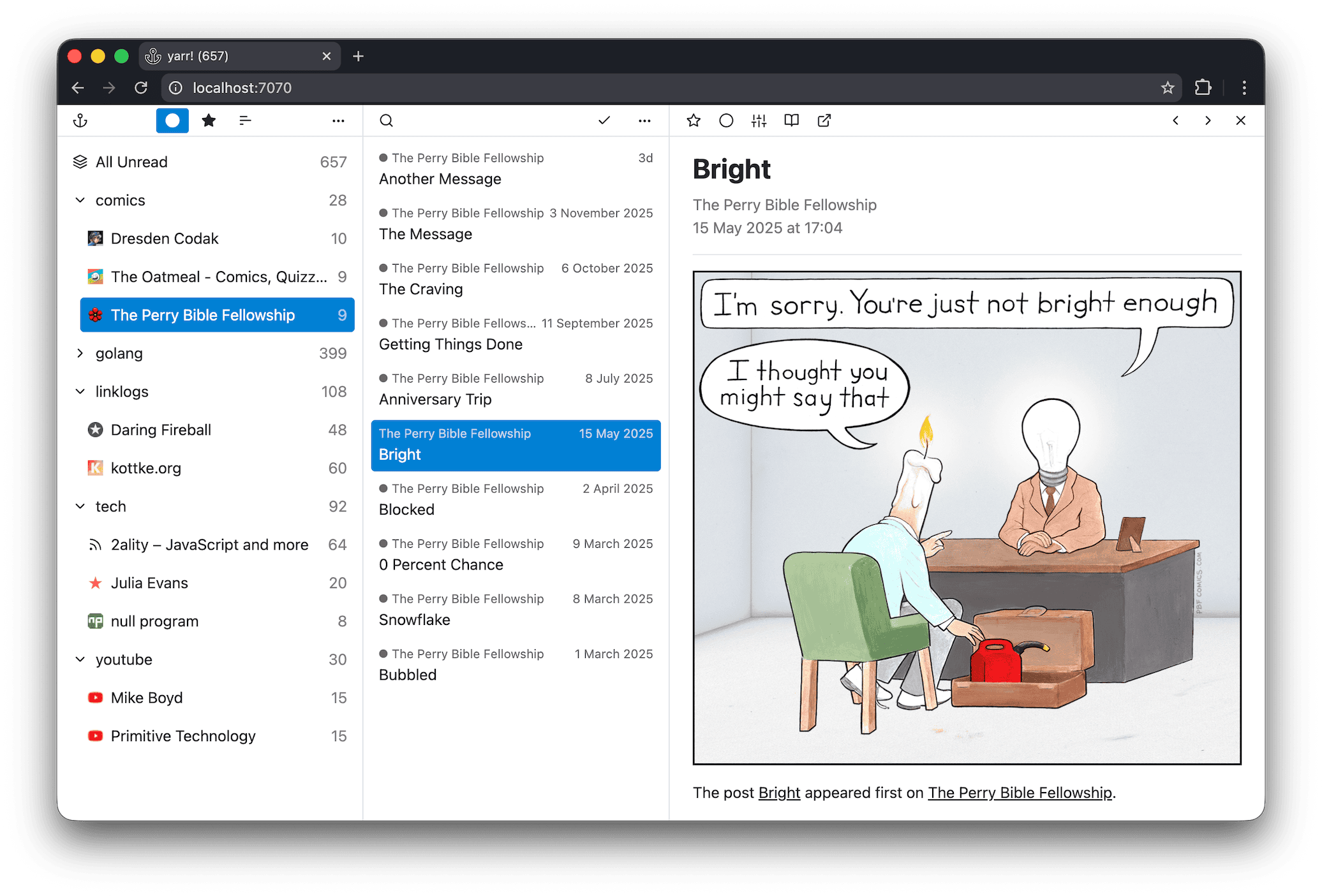
The main screen has three sections.
- Feed list - Use this section to select a feed or a folder.
- Article list - This section shows the articles from your selection.
- Article content - This section shows the content of the article you select.
Each section has a top bar with actions for that section.
The top bar of the feed list contains:
- filters - filter the list by unread, starred, or all articles
- global settings menu - add or refresh feeds, change theme, set auto-refresh rate, choose sorting, import/export subscriptions, view shortcuts, and switch language
The top bar of the article list contains:
- search field - search within the current selection
- mark all read - mark all articles in the current selection as read; visible only if the unread filter is set
- settings menu for the selected feed or folder - open the website, rename, move, or delete
The top bar of the article content contains actions for the selected article:
- star toggle - mark the article as starred
- read toggle - mark the article as read or unread
- article appearance settings - choose the font and adjust the text size
- read here - fetch and display the full article content
- open in browser - open the article link in a new tab
- left chevron - navigate to the previous article in the list
- right chevron - navigate to the next article in the list
- close - close and unselect the current article